
This page controls the ARMweb.
When the user program is running this
page is disabled for security.
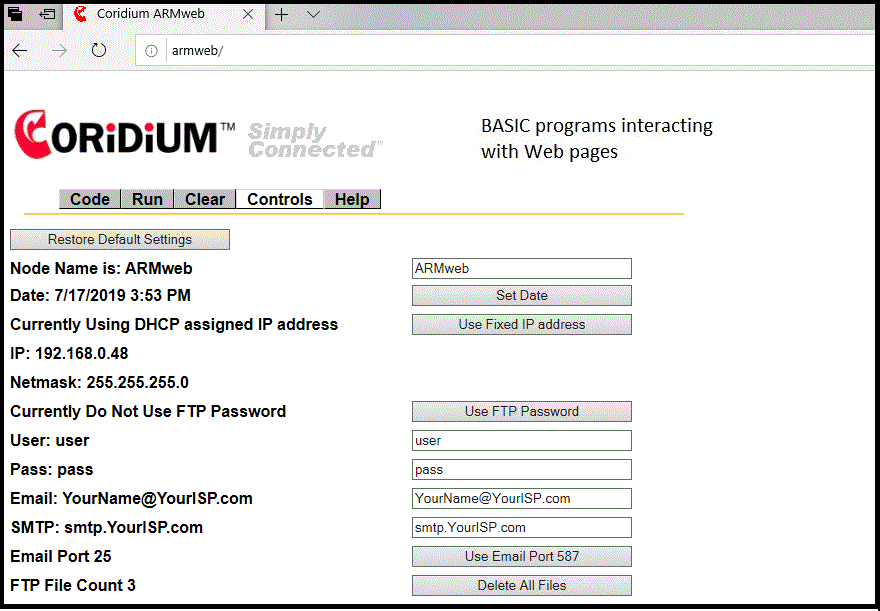
Node Name
:
The ARMweb's default node name is ARMweb, when you
change this main page, the ARMweb will adopt that entry as its node name.
The node name will be seen by DHCP servers, as well as the response to node ping
.
Set Date:
If your browser supports the JavaScript
system-time functions this button will access the systems date and time and
update the ARMweb registers.
DHCP :
The ARMweb node can either use a DHCP to
obtain its IP address, or you can set it to a fixed IP address. The
default is to accept a DHCP generated IP address.
We routinely allow the DHCP server to assign an initial address, but will use a fixed IP address in the final setup. One reason to assign a fixed IP, is to make sure that the IP address assigned never changes, for instance following a power outage.
Passwords:
The ftp service can use a password (the
default is none or user/pass and password checking turned off). If you do
set a different username and password also click the Use Password button.
Email:
The MAIL statement can send an email to the
address and server set by these fields. The SMTP server for name@somewhere.com is normally
smtp.somewhere.com .
FTP file count:
This keeps track of the number of files in the FTP area. It also
provides a mechanism to clear and reset the FTP space..