
ISP (bootloader) checks
ISP bootloader
To load a C program, the NXP ISP bootloader is invoked. This is also used by the Connection test in TclTerm and BASICtools.
Connections
Whether its part of the PRO family or has a builtin USB connection, 6 wires make up the primary connection to an ARM for all Coridium products.
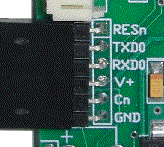
Those connections include power (V+) and GND.
Serial connections to UART0 (TXD0 from the ARM to the PC, RXD0 from PC to the ARM).
RESn is the reset line (active low -- places the device in reset)
Cn is held low on P0.14, P2.10 or P0.1 low during RESET, to place the part in ISP mode, but its normal state is high.
Controlling these pins from TclTerm and BASICtools
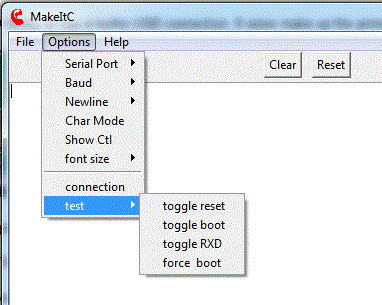
You can use a meter to check the states of these pins.
RESn should normally be a logic 1. And you will see it change to a 0 and back when toggle reset is selected.
Toggle boot will drive Cn low and high (high being the normal state).
Toggle RXD will send a set of characters out to the UART0 of the ARM (it will be visible even on a simple meter)
force boot will drive Cn low, and can be used to manually put the part into ISP mode. This is done by being in Char Mode (send 1 character at a time, rather than buffereing up a line), toggle reset, send ?, send Synchronized. The ARM will echo Synchronized back.
For a Coridium USB dongle these are the expected states of the pins unless you changed the programming of the FT232RL . On other hardware if the states of pins does not agree with what is expected, check your wiring. If you see no activity at all, then you may have chose the wrong COM port, or don't have the FTDI driver installed.