
LPC1768 contains a small File System to store additional web pages.
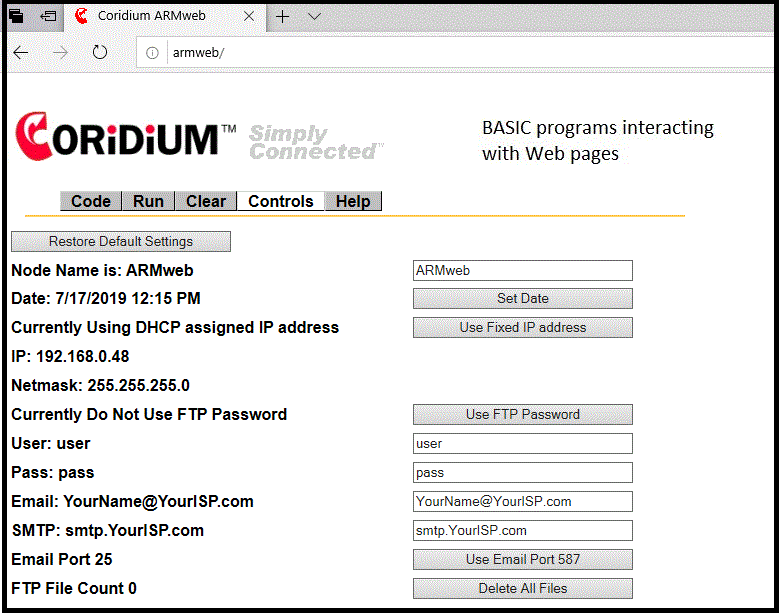
By default password protection is not used for FTP.
If logging in from a command prompt simply press enter when asked for Username and Password.
If password protection is desired go to the Controls page of ARMweb and select Use Password.
NOTE : The default user name is "user" and password "pass", when
enabled.
Change these as desired and reset the node to apply changes.
Also on the Controls page, a file from the system may be chosen as the Main Page.
This then becomes the default
page when browsing to http://ARMweb or to http://Nodes-IP-address
.
The
current implementation is aimed
at using the simplest ftp interface, and it may not work with more complex ftp
programs or browsers doing ftp. We recommend using the Windows ftp from
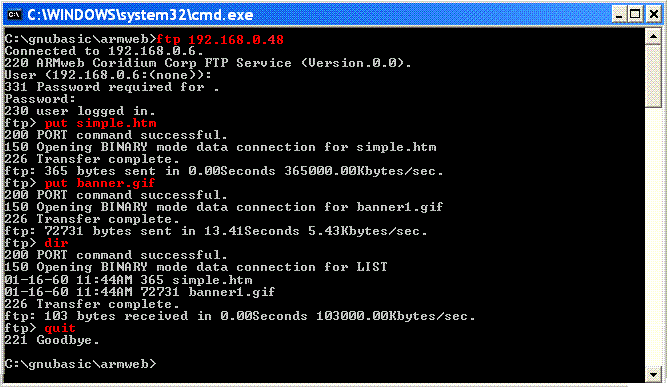
the DOS command prompt. Here is a sample session used to copy the files
for a web page to the ARMweb (192.168.0.48 was assigned by the DHCP, and the
default username/pass were used (either enter user and pass, or just hit enter
both times).
After the above ftp session a web page has been setup on the ARMweb. It can be viewed at http://192.168.0.48/simple.htm.
To make that you are communicating with webBASIC start from the main page..
From then on, when you navigate to http://192.168.0.48/simple.htm .
See also