
BASICweb allows for basic code to be embedded in the web pages
much like PHP or JavaScript
Global variables may be accessed from the User BASIC
program. The intention is not to place your BASIC code in this program, but to
interact with your program from a web page. For example if you put
an endless loop in the <?BASIC embedded in the web page, the web page
will hang. <>BASIC can not call BASIC functions or subroutines in the user
code.
Example: Add reading
and setting a User variable through the web
page.
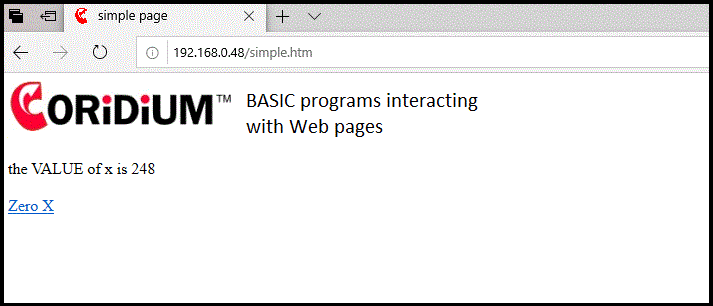
Here is a modified version of the web page loaded from Web Services and a second webpage that resets the value of X
source for simple.htm
<!DOCTYPE html PUBLIC "-//W3C//DTD HTML 4.01 Transitional//EN">
<html>
<head>
  <meta content="text/html; charset=ISO-8859-1" http-equiv="content-type">
  <title>simple page</title>
</head>
<body>
<?BASIC
  print "the VALUE of x is ";x
?>
<br>
<br>
<a href="zero.htm">Zero X</a>
</body>
</html>
Now from Code page of ARMweb enter the following program (its can be accessed at armweb.htm)
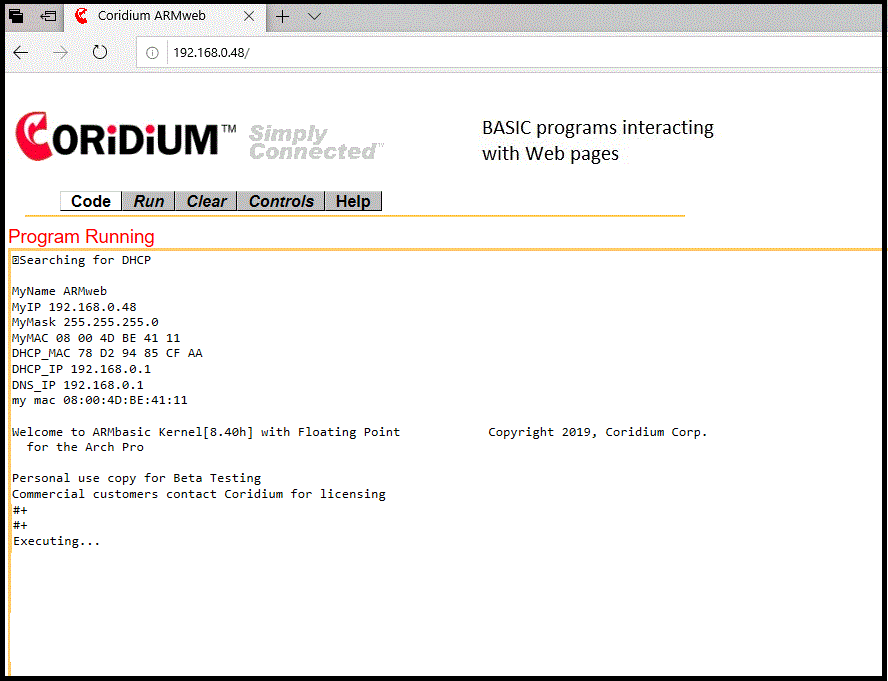
WHILE 1
IO(55) = X AND 1 ' Flash the
LED
X = X + 1
WAIT
(500)
LOOP
RUN
The program is running and the value of X is
incremented every half second.
Browse to http://ARMweb/simple.htm
Refreshing the browser will show the updated values of X.
Example: Executing a BASIC command from a web page.
To the above example we will add a method to set the variable x to 0, by accessing
another web page that runs a BASIC program. This may also be
accomplished with CGI, see the CGI examples .
First add an anchor to another web page that will be served by the ARMweb
<!DOCTYPE html PUBLIC "-//W3C//DTD HTML 4.01
Transitional//EN">
<html>
<head>
<meta content="text/html;
charset=ISO-8859-1" http-equiv="content-type">
<title>simple page</title>
</head>
<body>
<?BASIC
print "the VALUE of x is ";x
?>
<br>
<br>
<img style="width: 500px;
height: 80px;" alt="planes" src="banner1.gif">
<a
href="zero.htm">Zero Y</a>
</body>
</html>
Next create another page zero.htm that executes a very short BASIC program to zero the variable y. This page also returns to the original page.
source for zero.htm
<!DOCTYPE html PUBLIC "-//W3C//DTD HTML 4.01 Transitional//EN">
<html>
<head>
  <meta content="text/html; charset=ISO-8859-1" http-equiv="content-type">
  <title>simple zero page</title>
</head>
<body>
<?BASIC
  print "the VALUE of x was ";x;"<br>"
  x = 0
  print "the VALUE of x is now";x
?>
</body>
</html>
<
/PRE>

<  /FONT>
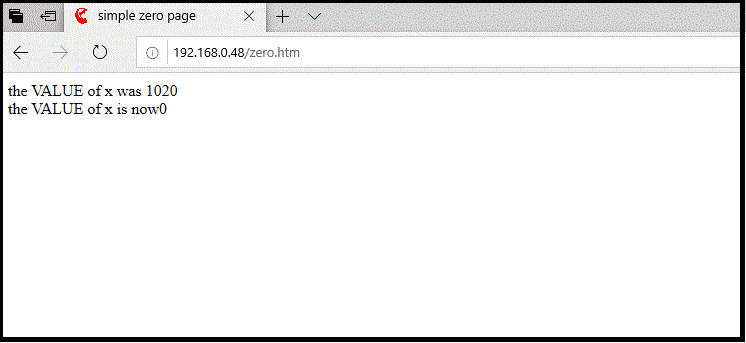
Some notes, currently errors in the BASIC embedded in HTML are not flagged, so be careful, but they will be visible to the console of BASICtools over the USB connection.
The meta tag highlighted will return you to the original page after 1 second, though not all browsers support this.
For a CGI method to accomplish the same see the CGI examples .
WEB BASIC limits
The BASIC code between <?BASIC and ?> is limited to 1450 characters.
The output from a web BASIC program must not exceed 1460 characters.
If the web BASIC contains an infinite loop, the server will hang waiting for the loop to complete.
The Pre-processor is not available to WEB BASIC inside the HTML. That includes #include, #ifdef, #define...
The code between <?BASIC ... ?> and the output is also sent to the UART0 (and via USB Dongle or mbed USB serial port to BASICtools).